


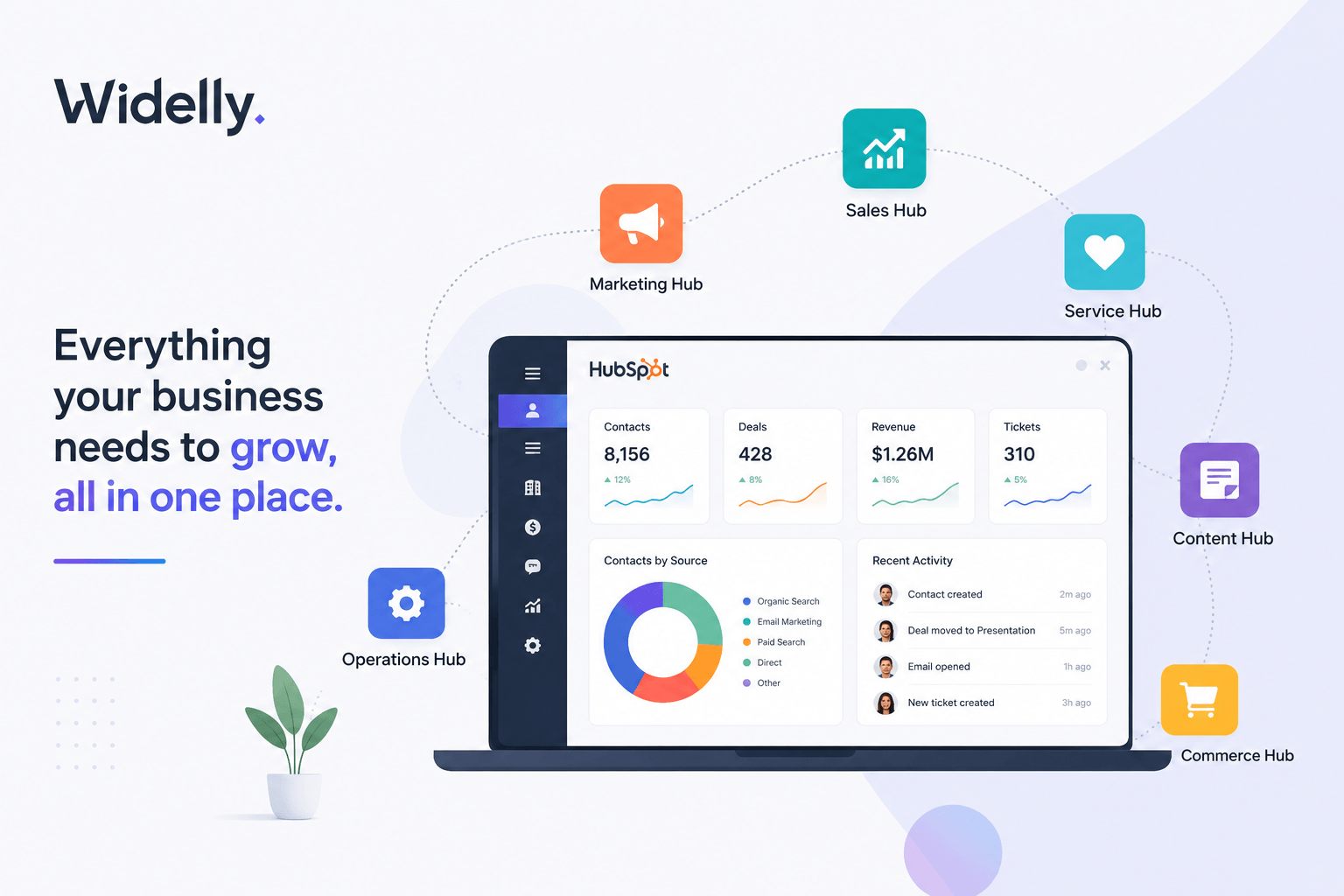
HubSpot started as a two-person marketing software company in 2006. It is now a $2.6B revenue public company used by more than 228,000 paying customers worldwide. More importantly for buyers evaluating it today: HubSpot has become the default CRM and revenue platform for B2B companies from 10 to 2,000 employees that want marketing, sales, service, and operations running in a single connected system.
But what does HubSpot actually do? And more practically – is it the right platform for your business? This guide explains HubSpot from first principles: what it is, how the hubs work, what it costs at different scales, and who it is genuinely right for.
Why Companies Look at HubSpot:
Most growing businesses use separate tools for marketing, sales, customer support, reporting, and customer data management. Over time, these disconnected systems create duplicate data, broken integrations, inconsistent reporting, and poor visibility across the customer journey.
HubSpot was designed to solve this problem by bringing customer data, marketing automation, sales activities, service operations, and reporting into a single platform.
What Is HubSpot?
HubSpot is a cloud-based CRM and customer platform that helps businesses manage marketing, sales, customer service, content, operations, and commerce from a single system. It enables teams to work from one shared customer database instead of multiple disconnected tools.
What Is HubSpot, Exactly?
At its core is the Smart CRM – a unified database that stores every contact, company, deal, ticket, and interaction in a single record accessible to all of HubSpot’s products simultaneously. Built on top of this CRM layer are six product “hubs,” each serving a different function: Marketing, Sales, Service, Content, Operations, and Commerce.
Unlike traditional software stacks where marketing runs on Marketo, sales runs on Salesforce, and service runs on Zendesk (all separately integrated), HubSpot’s hubs natively share data. A form submission in Marketing Hub instantly updates the contact record visible to the Sales Hub rep. A service ticket in Service Hub automatically shows on the deal record. This is HubSpot’s core architectural advantage.
The Six HubSpot Hubs Explained
| Hub | What It Does | Best For | Starting Price |
|---|---|---|---|
| Marketing Hub | Email, campaigns, lead capture, automation, social media | Demand gen, content, lead nurture | $800/mo (Pro) |
| Sales Hub | Pipeline, sequences, meetings, forecasting, deal management | Sales teams, RevOps | $90/seat/mo (Pro) |
| Service Hub | Tickets, knowledge base, CSAT, SLA management | CS and support teams | $90/seat/mo (Pro) |
| Content Hub | Website CMS, blog, landing pages, smart content | Marketing, web teams | $300/mo (Pro) |
| Operations Hub | Data sync, deduplication, custom code, reporting | RevOps, data teams | $720/mo (Pro) |
| Commerce Hub | Payments, quotes, invoices, subscriptions | Sales, billing operations | Free + transaction fees |
How HubSpot’s Pricing Actually Works
HubSpot pricing is both simpler and more complex than it appears. Each hub is priced separately and scales by tier: Free, Starter, Professional, and Enterprise. Free plans exist for CRM, Marketing (up to 2,000 email sends/month), and Sales (basic pipeline). Professional tiers unlock automation, advanced reporting, and sequences. Enterprise adds custom objects, predictive scoring, and SSO.
The most common mistake buyers make: selecting a tier that seems affordable per hub, then discovering that the features they actually need (advanced automation, multi-touch attribution, custom reporting) sit in Professional or Enterprise. A realistic budget for a 20-person B2B team using Marketing Hub Pro + Sales Hub Pro typically runs $2,500 to $4,000 per month before onboarding and implementation costs.
| Company Size | Recommended Hubs | Estimated Monthly Cost |
|---|---|---|
| 1-10 employees | CRM Free + Marketing Starter + Sales Starter | $50-$200/mo |
| 10-50 employees | Marketing Pro + Sales Pro | $1,800-$3,500/mo |
| 50-200 employees | Marketing Pro/Ent + Sales Pro + Service Pro | $3,500-$8,000/mo |
| 200-1,000 employees | Enterprise suite (1-2 hubs) + additional hubs | $8,000-$25,000+/mo |
What HubSpot Does Well
HubSpot excels at four things. First, speed to value: most companies have their first workflows running within 2 to 4 weeks of purchase. Second, user adoption: HubSpot is frequently recognized on software review platforms such as G2 and Capterra for its ease of use and strong user adoption, primarily because it was designed for the people entering data, not the administrators configuring it. Third, native marketing-to-sales alignment: because both teams use the same contact database, lead handoffs are frictionless and attribution is accurate. Fourth, the free CRM tier: for companies just starting to formalise their revenue process, HubSpot CRM is widely considered one of the strongest free CRM options available for growing businesses.
What HubSpot Does Not Do Well
HubSpot has real limitations. Enterprise-grade customisation – complex custom objects, deep CPQ logic, custom coded integrations at scale – is where Salesforce still has a structural advantage. HubSpot Enterprise is significantly more capable than it was in 2020, but it is still not the right choice for a 1,000-seat company with 15 years of Salesforce customisation and 200 AppExchange integrations. HubSpot is also not ideal for project management (no native Gantt, no complex task dependencies) or ERP integration at scale.
HubSpot Pros and Cons
Advantages
- Easy to learn and use
- Fast implementation compared to enterprise CRMs
- Unified marketing, sales, and service platform
- Strong automation capabilities
- Excellent reporting and dashboards
- High user adoption rates
Limitations
- Pricing can increase as contact databases grow
- Advanced features require Professional or Enterprise plans
- Less customizable than Salesforce for large enterprises
- Not designed as an ERP or project management system
- Complex implementations may require partner support
| Use Case | HubSpot Wins | Salesforce Wins |
|---|---|---|
| Implementation speed | 4-8 weeks typical | 6-18 months typical |
| User adoption rate | 75-90% post-onboarding | 55-70% typical |
| Total cost (mid-market) | 40-60% lower than Salesforce stack | Higher but more customisable |
| Native marketing+sales | Fully unified on one CRM | Requires integration or Pardot |
| Deep customisation | Enterprise tier, some limits | Near-unlimited with developers |
| AppExchange ecosystem | 600+ integrations | 4,000+ AppExchange apps |
Real-World Scenario
VP Revenue – 75-Person B2B SaaS Company
The company had used Salesforce for 4 years. CRM adoption was 61%. Reps managed pipeline in a shared Notion doc alongside Salesforce because “Salesforce takes 3 minutes to load an opportunity.” The marketing team ran on HubSpot Marketing Hub (disconnected from Salesforce via a sync that broke twice a year). Every quarter, the ops team spent 3 days reconciling pipeline data. After migrating fully to HubSpot CRM + Sales Hub Pro + Marketing Hub Pro in 8 weeks, adoption hit 87% within 60 days. The quarterly reconciliation was eliminated. Annual CRM cost dropped from $180,000 to $84,000.
Is HubSpot Right for Your Business?
HubSpot is the right choice when: you have between 10 and 500 employees, your marketing and sales teams are currently on different platforms, your CRM adoption is below 70%, your current implementation took longer than 6 months, or your team needs a system they can manage themselves without a dedicated Salesforce administrator. HubSpot is less likely the right choice if you have 1,000+ employees with deep Salesforce customisation, complex CPQ requirements, or a need for more than 200 AppExchange integrations.
Who Should Not Use HubSpot?
HubSpot is not the right solution for every company.
- Organizations with thousands of CRM users
- Businesses requiring highly customized ERP integrations
- Companies dependent on complex CPQ workflows
- Enterprises with years of Salesforce-specific customization
- Organizations requiring extensive custom development across multiple business units
Top HubSpot Alternatives
While HubSpot is one of the most popular CRM platforms, it is not the only option available. Depending on your business requirements, the following alternatives may be worth evaluating.
| Platform | Best For |
|---|---|
| Salesforce | Large enterprise organizations |
| Zoho CRM | Budget-conscious businesses |
| Pipedrive | Sales-focused teams |
| Freshsales | Growing SMBs |
| Microsoft Dynamics 365 | Organizations using Microsoft products extensively |
Frequently Asked Questions
❓ Does HubSpot replace Salesforce?
For mid-market B2B companies (10-500 employees), HubSpot replaces Salesforce CRM and often also replaces Marketo or Pardot. For enterprise companies with deep Salesforce customisation (500+ employees, complex custom objects, 100+ integrations), HubSpot is typically added alongside Salesforce for marketing rather than replacing the CRM.
❓ Is HubSpot good for startups?
Yes. The free CRM is genuinely useful for early-stage companies. Most startups grow into Marketing Starter and Sales Starter ($50-$200/month) before moving to Professional tiers when automation and advanced reporting become critical. The path from free to enterprise is smooth and can scale without re-implementation.
❓ How long does HubSpot implementation take?
A standard implementation (CRM + one or two hubs) takes 4-8 weeks with a HubSpot partner. Enterprise implementations with data migration, custom objects, and complex workflow builds take 8-16 weeks. DIY implementation without a partner typically takes 2-3x longer.
❓ Can HubSpot connect to my existing tools?
HubSpot has 600+ native integrations including Salesforce, Slack, Zoom, Google Workspace, Microsoft 365, Shopify, and most major ERPs. The HubSpot App Marketplace covers the majority of common B2B software stacks. Custom integrations can be built via the HubSpot API or using Operations Hub’s custom code actions.
About This Guide
This guide is based on HubSpot product documentation, CRM implementation best practices, software evaluation frameworks, and practical experience helping B2B organizations assess CRM and revenue operations platforms.
Final Thoughts
HubSpot has evolved from a marketing automation platform into a complete customer platform that combines CRM, marketing, sales, service, operations, and commerce in a single ecosystem.
For most B2B companies with 10 to 500 employees, HubSpot offers one of the fastest paths to aligning teams, improving CRM adoption, and creating a unified view of the customer journey.
The platform is not perfect for every business, particularly large enterprises with extensive customizations. However, for growing organizations looking to simplify their technology stack and improve operational efficiency, HubSpot remains one of the strongest CRM platforms available today.
Ready to evaluate HubSpot for your team? Widelly runs a free HubSpot readiness assessment – we map your current stack, identify the right hubs and tier, and give you a realistic implementation timeline and cost estimate.
Related Topics
About the Author

Mohan raj
Expert contributor at Widelly, sharing insights on B2B and B2C growth strategies.
Related Articles

How Service Teams Use HubSpot to Improve Customer Retention
Retention Is the Most Profitable Revenue Activity Acquiring a new customer costs 5-7x more than…

HubSpot Data Governance Best Practices for Clean CRM Data
Bad Data Is the Silent CRM Killer Every CRM implementation starts with clean data. Within…

HubSpot for Revenue Operations Teams: The Complete RevOps Guide
HubSpot Is the RevOps Platform – Not Just a CRM Revenue Operations (RevOps) is the…